“They came all the way to the front of the restaurant, but for some reason they walk past without coming in…”
If this happens, it may not be about the food—there may be unspoken “pre-visit anxiety” still left unresolved.
In this article, to help ease the common hesitation first-time guests have at Indian restaurants, we’ve put together six respectful, reassuring phrases that never feel rude to anyone, plus concrete examples of where to place them—at the entrance, on the menu, and on Google.
Why does “I’m interested, but it feels hard to walk in” happen?
Key takeaway of this section
First-time guests tend to hesitate when they can’t “see” the price range, spice level, how ordering works, or the atmosphere.
Making these visible with a short “one-liner” lowers the hurdle at the door.
First-time guests hesitate at the entrance not because they’re judging whether it’s a “good restaurant,” but because it’s hard to imagine whether they can use it smoothly without trouble.
Filling in this gap carefully is hospitality itself, regardless of culture or nationality. It becomes a thoughtful touch that feels comfortable for anyone.
Five points first-time guests often get stuck on
- ■
Price range is unclear (typical lunch/dinner budget) - ■
Worried about spice level (can it be adjusted, how spicy is it?) - ■
Hard to picture how ordering works (set vs. à la carte, not sure what to choose) - ■
Language anxiety (is it easy to ask questions or confirm details?) - ■
Atmosphere inside (easy to enter solo / with family?)
(Source:Google Business Profile Help: Edit your business information)
Six phrases that help first-time guests feel comfortable walking in (respectful wording)
Key takeaway of this section
These phrases are written not as “assumptions,” but as making consideration visible.
Just aligning these six can reduce hesitation at the door.
From here, these are short template lines you can use as-is for entrance signs, menus, and Google (Business Profile).
All of them are written in natural wording that anyone can read, without labeling the person.
① “First-time guests are welcome” (a gentle push at the entrance)
- ■First-time guests are very welcome
- ■We have recommended set meals available
② “Spice level can be adjusted” (turn anxiety into “I can choose”)
- ■Spice level can be adjusted to your preference (e.g., 0–5)
- ■Mild is also available. Please feel free to ask
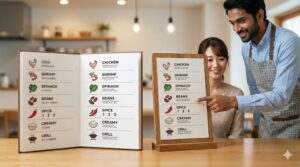
③ “We have a photo menu” (reduce ordering hesitation)
- ■We have a photo menu available
- ■An easy-to-understand menu with clear set details
④ “Service in Japanese is also available” (turn language anxiety into support)
- ■Service in Japanese is also available
- ■Point-and-order is welcome
⑤ “Lunch/Dinner budget guide” + “Cashless payments” (one glance before visiting)
- ■Lunch: from ¥___〜/Dinner: from ¥___〜
- ■We accept various cashless payments (cards / e-money / QR, etc.)
⑥ “Solo diners welcome” + “Families are welcome” (help them picture their situation)
- ■Solo diners are welcome
- ■Families can also dine comfortably with us
| Phrase (short template) | Recommended placement | Hesitation it resolves |
|---|---|---|
| First-time guests welcome | Entrance / Google posts | “Is it okay to go in?” |
| Spice level can be adjusted | Menu / Table sign / Google menu photos | “What if it’s too spicy?” |
| We have a photo menu | Entrance / Menu / Website | “What should I order?” |
| Service in Japanese is also available | Entrance / Google overview | “I want to ask, but it’s hard to say” |
| Lunch/Dinner guide + payment options | Entrance / Google (info & attributes) | “I’m unsure about budget and payment” |
| Solo diners welcome + Families OK | Entrance / Google posts | “Can I use it in my situation?” |
The key to results is “where you place them”: the 3-piece set of Entrance, Menu, and Google
Key takeaway of this section
“Entrance = instant reassurance” “Menu = remove hesitation” “Google = final check before visiting.”
Using the same phrases in all three places makes it easier to understand.
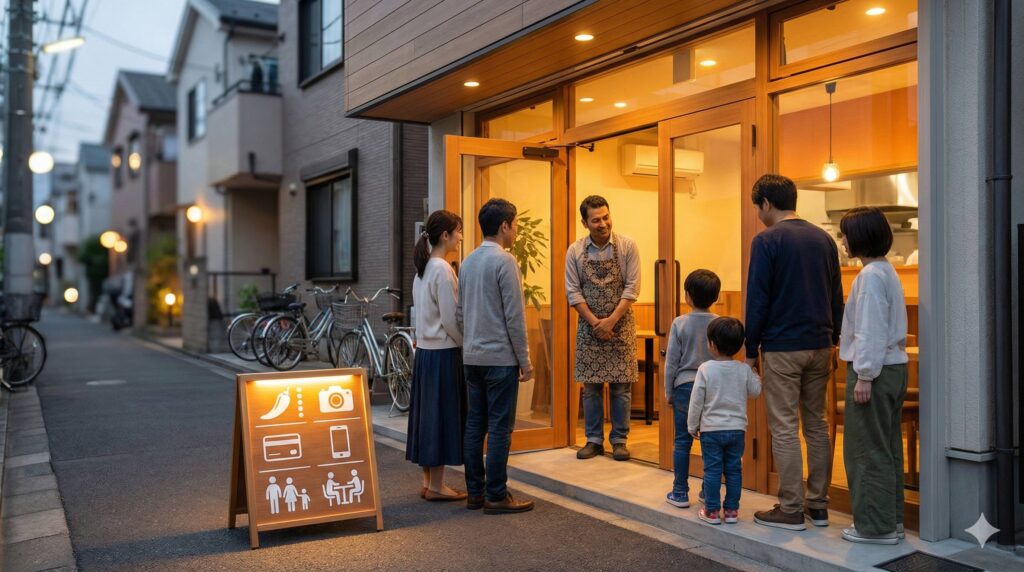
(1)Entrance: communicate in 3 seconds (short phrases + large type)
At the entrance, long sentences are less effective than short, easy-to-read words.
Example: “First-time guests welcome” + “Spice level can be adjusted”
(2)Menu: explain “just before” doubts appear
Spice level, set contents, and recommendations are where people often hesitate. A photo + a short note is enough.
Example: “Spice level: 0–5 (0 is mild)” “Most popular No.1: Butter Chicken (recommended for first-timers)”
(3)Google (Business Profile): refine the “final check” before visiting
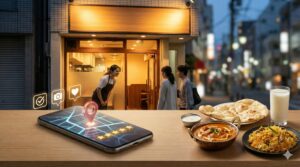
Many people check opening hours, photos, price feel, payment options, and atmosphere on Google Search or Google Maps before they visit.
Updating business information, managing attributes (payment methods, etc.), posting, and adding photos are official features.
(Source:Google Business Profile Help: Edit your business information/
Manage attributes/
Create and manage posts/
Business Profile photo tips)
Design tips: communicate through “how it looks” rather than adding more words
Key takeaway of this section
Reassurance comes less from “how much information” and more from readability (white space, font size, photos).
Small adjustments can change the impression.
Common mistakes (wasteful examples)
- ■The entrance sign is long, and people have to stop to read it
- ■The text is small and can’t be seen at night or on rainy days
- ■Photos are dark/blurry, making cleanliness and atmosphere hard to convey
Minimum improvement set (you can start today)
- ■Keep the entrance to two phrases max (e.g., First-time welcome + Spice adjustment)
- ■Make photos brighter (a food close-up + one shot that shows the inside atmosphere)
- ■On Google, prepare exterior, interior, and food photos (exterior photos from different angles are recommended)
(Source:Google Business Profile Help: Photo tips/
Manage photos and videos)
Create “reassuring words” tailored to your restaurant with ChatGPT / Gemini (time-saving template)
Key takeaway of this section
By entering your restaurant’s features, you can format entrance signs, menu descriptions, and Google post copy.
However, always do the final check with human eyes.
At the N, we often use ChatGPT and Gemini to draft copy.
Here are example prompts you can use to produce wording by purpose while keeping “respectful phrasing.”
Copy-and-paste prompt (Entrance sign / Menu / Google posts)
You are a copywriter for a restaurant.
Based on the restaurant information below, create wording that helps “first-time guests feel comfortable,” in polite, respectful Japanese that does not feel rude.
【Restaurant Information】
・Name: ____
・Location (e.g., Edogawa City): ____
・Budget guide: Lunch from ¥__円〜/Dinner from ¥__円〜
・Spice level: 0–5 (adjustable / not adjustable): ____
・Popular menu item: ____ (and if there’s one recommended for first-timers)
・Payment: Cash / Card / E-money / QR: ____
・Typical guests: Solo diners / Families / Takeout: ____
【What I want you to output】
1) For entrance signs (7–15 characters × 3 ideas)
2) Menu notes (2 lines × 3 ideas: spice / set explanation / recommendation)
3) Google posts (90–120 characters × 2 ideas: polite and easy to read)
* Do not use labeling expressions (e.g., “for Japanese people”). Use wording that feels comfortable for anyone who reads it.
Also, when posting on Google Business Profile, professional and respectful wording is recommended (avoid typos, unnecessary strings, aggressive expressions, etc.).
(Source:Google Business Profile Help: Create and manage posts/
Post content policy)
Frequently Asked Questions (FAQ)
Key takeaway of this section
Making consideration visible isn’t “for a specific group”—it’s a kind design for everyone.
Use the FAQ to resolve concerns in advance.
Q. Is it rude to write “Service in Japanese is also available”?
A.
If you write it not as “some people can’t do X,” but as an 안내 that “we can support you,” it feels natural. Pairing it with something convenient for anyone—like “Point-and-order welcome”—makes it even softer.
Q. Won’t showing the price range make us look cheap?
A.
Price is not about “cheapness”—it’s reassurance. Even a simple guide like “Lunch from ¥___” reduces anxiety before visiting. The higher the quality of the restaurant, the easier it is to keep the impression polished by showing it together with good photos.
Q. What should we start with first for the biggest effect?
A.
The fastest route is to put two phrases at the entrance: “First-time welcome + Spice adjustment,” and align your Google photos (exterior, interior, and food). Next, add a “budget guide” and “payment options,” and hesitation before visiting tends to drop even further.
Summary: the key to increasing first-time visits is designing for reassurance
Key takeaway of this section
Align the six phrases across Entrance, Menu, and Google.
That alone can reduce the feeling of “I’m interested, but I can’t walk in”.
The appeal of an Indian restaurant isn’t only the taste. The aroma, warm service, and the atmosphere—everything is a strength.
That’s why, for people hesitating at the entrance, simply placing a short, easy-to-understand “sign of reassurance” can change the flow of first-time visits.
“I want to fix the entrance signs, menus, and Google all at once—but I don’t have time.”
In that case, start by improving a small part first.
If you want to start small with “Photos + LP + Google Business Profile,” the N’s Small-Start Design Pack can be one option.
▶ View plan details
[Communication note]
I am not a fluent English speaker, and English is not my strong skill.
For meetings or detailed discussions in English, we will mainly use translation tools (including AI-based translation).
Because of this, there may be cases where communication is not conveyed 100% perfectly.
However, I will always take time to confirm details carefully, ask follow-up questions when needed,
and make sure we reach a shared understanding before proceeding.
Please feel free to use simple English.
Not monthly payments—start from a one-time “¥50,000+”.
the N fully supports the “first step” of business owners in Edogawa City.
First, tell us about your business.
Or feel free to reach out via Instagram DM (@the.n.sns).